Get every family on the BusRight Parent App
Free, ready-to-use materials for transportation and communications teams: postcards, flyers, posters, social posts, emails, text messages, and ChatGPT prompts. Each one points families to the invitation email and helps them sign in.
How families join
Families can't sign up for the BusRight Parent App on their own. Your district invites them by email, and they sign in with that same email. Every piece in this kit points families toward that invitation.
Find the invitation
The email comes from noreply@busright.me with the subject "You're Invited to BusRight." It goes to the address the school has on file. Many land in spam or promotions folders.
Download the app
The BusRight app is free on the App Store and Google Play.
Sign in with that email
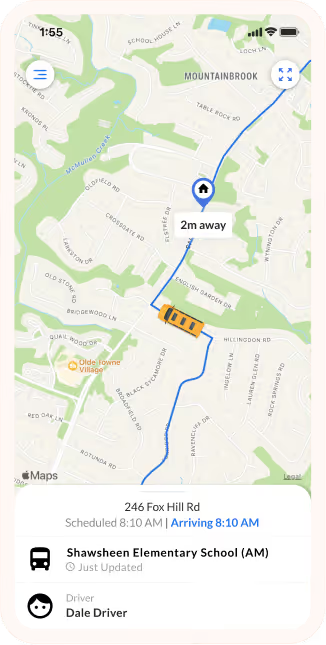
Families enter the invited email and the code BusRight emails them. Their student and bus route appear. No password needed.
Your launch plan
Four moments, all keyed to your invitation date. Families trust messages from their district, so send everything from your own email, text, phone, and social channels.
Two weeks before
Heads-up
Families know it's coming and confirm the school has their email. Send the heads-up email and social post, and put up flyers and posters.
Invitation week
Check your inbox
Families find the email and sign in. Send the launch email, a text, and an automated call the same day, and send postcards home.
One to three weeks after
Nudge
Resend invitations yourself: in Users > Parents, filter by Invite Status, select all, and choose Send Invite. Then send reminders and focus outreach on routes with the fewest families signed in.
Ongoing and every back-to-school season
Keep it going
Invite new families as they register, and relaunch every back-to-school season when routes change and new riders join.
Download everything
Every piece is ready to print or post as is, in English and Spanish. Get it all at once, or pick what you need.
Before launch
Let families know the app is coming and to keep their email current.
Pre-launch flyer, EnglishPre-launch flyer, SpanishTake-home and handouts
For backpacks, front offices, registration and events.
Postcard, 6 x 4 in, EnglishPostcard, 6 x 4 in, SpanishFlyer, 8.5 x 11 in, EnglishFlyer, 8.5 x 11 in, SpanishSign-in card, 4 x 4 in, EnglishSign-in card, 4 x 4 in, SpanishSign-in steps
Full view, or limited view for districts where the bus appears only near the stop.
Download steps, full view, EnglishDownload steps, full view, SpanishDownload steps, limited view, EnglishDownload steps, limited view, SpanishPosters, signs and stand
For entrances, bus loops, pickup lines and events.
Poster, 11 x 17 in, EnglishPoster, 11 x 17 in, SpanishPoster, 18 x 24 in, EnglishPoster, 18 x 24 in, SpanishPoster, 24 x 36 in, EnglishPoster, 24 x 36 in, SpanishYard sign, 18 x 12 in, EnglishYard sign, 18 x 12 in, SpanishPopup stand, 33 x 80 inSocial media
Four posts, one for each step of the launch plan, as squares for feeds and stories. Captions are in the copy library.
Post 1, before invitations (square)Post 1, before invitations (story)Post 2, invitation day (square)Post 2, invitation day (story)Post 3, reminder (square)Post 4, everyday value (square)FAQ and training
Answers for families and a slide walkthrough of the app.
Parent FAQ, EnglishParent FAQ, SpanishTraining guide, EnglishTraining guide, SpanishGuides and copy
How to run your launch, plus every email, text and post.
District guide (PDF)Copy library (Word)ChatGPT prompts (Word)Logos and images
For your own flyers, posts and ChatGPT designs.
BusRight logo, navy (PNG)BusRight logo, navy (SVG)BusRight logo, white (PNG)BusRight logo, white (SVG)Parent App screen on a phoneFamily photoOther languages: French, Haitian Creole, Twi, Nepali, Oromo, Fulani, Amharic and Urdu versions are on the way. Need one sooner? Email support@busright.com.
Make your own versions with ChatGPT, Claude or any LLM
Many teams use ChatGPT, Claude and other LLMs to write posts, translate messages, or design graphics. Paste this fact sheet at the top of any prompt so the AI uses the right email address, steps, and wording. Download the images below and attach them when you ask for a graphic.
Try a prompt
Images to attach
- BusRight logo, navy (for light backgrounds)
- BusRight logo, white (for dark backgrounds)
- Parent App screen on a phone
- Brand colors: navy #09275A, yellow #F8C24B, app blue #2873E5. Font: Figtree, or Arial.
Download all seven prompts (Word) for emails, translations, newsletters, event flyers, and family FAQs.
Want a kit with your district's name on it?
We'll add your district name and transportation office phone number to every postcard, flyer, poster, sign and social image, and send you a ready-to-print package. Tell us a little about your district below.